Add a Subuser to an Atomic Networks Service
Adding a contact to your billing is useful in situations where you want to give someone else the ability to perform actions on your behalf. By adding a Sub-User to your account, you can give another user permissions to…
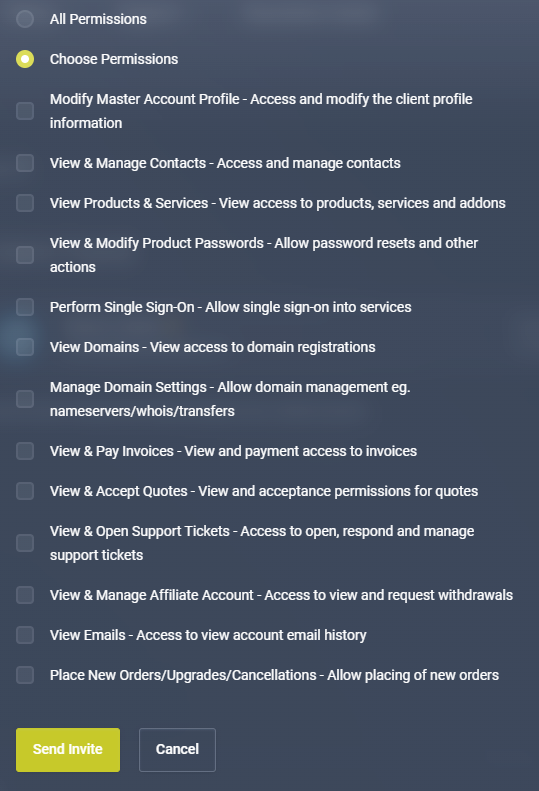
- Modify Your User Profile
- View Your Access to Services with Atomic Networks
- View and Modify Passwords for Panels
- View Domain Registrations
- View and Pay Invoices
- View and Open Support Tickets
- View and Manage Affiliate Account
- Place New Orders/Upgrades/Cancellations
- And more…
To add a Sub-User, follow the steps below…
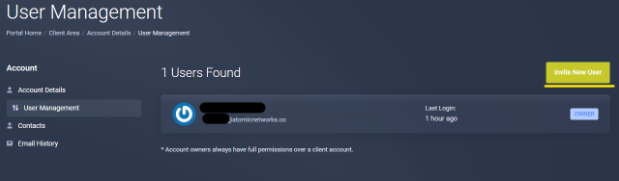
Step 1: Navigate to the User Management Dashboard
Step 2: Select “Invite New User”
Step 3: Insert Contact Email and Configure Permissions
Insert the email of the person you want to add as a sub-user to your billing panel.
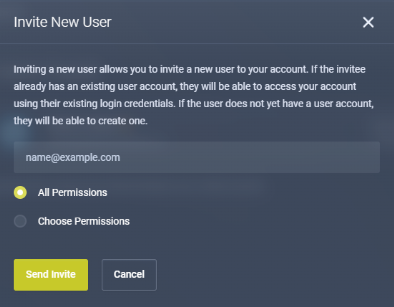
If you are looking to only have the user perform certain tasks (ex. giving them permission to pay invoices, but not allowing them to purchase new packages) click the “Choose Permissions” tab and select which permissions you would like to grant to them.
Note: Do not give a Sub-User “All Permissions” unless you are comfortable with them having complete control over your Billing Panel.